AI Applications
Choose an AI model to get started
Video Generation
Image Generation
Audio Generation
Video Effects
Z-Image-Turbo
Ultra-fast 6B-parameter text-to-image model optimized for production workloads. Generates photorealistic images in just 8 sampling steps with sub-second latency. Supports bilingual prompts (English/Chinese) and on-image text rendering.
Input
Output
Generated content will appear here
Example Results

Text-to-Image:
A cinematic photo of an astronaut riding a horse on Mars, dramatic lighting, highly detailed
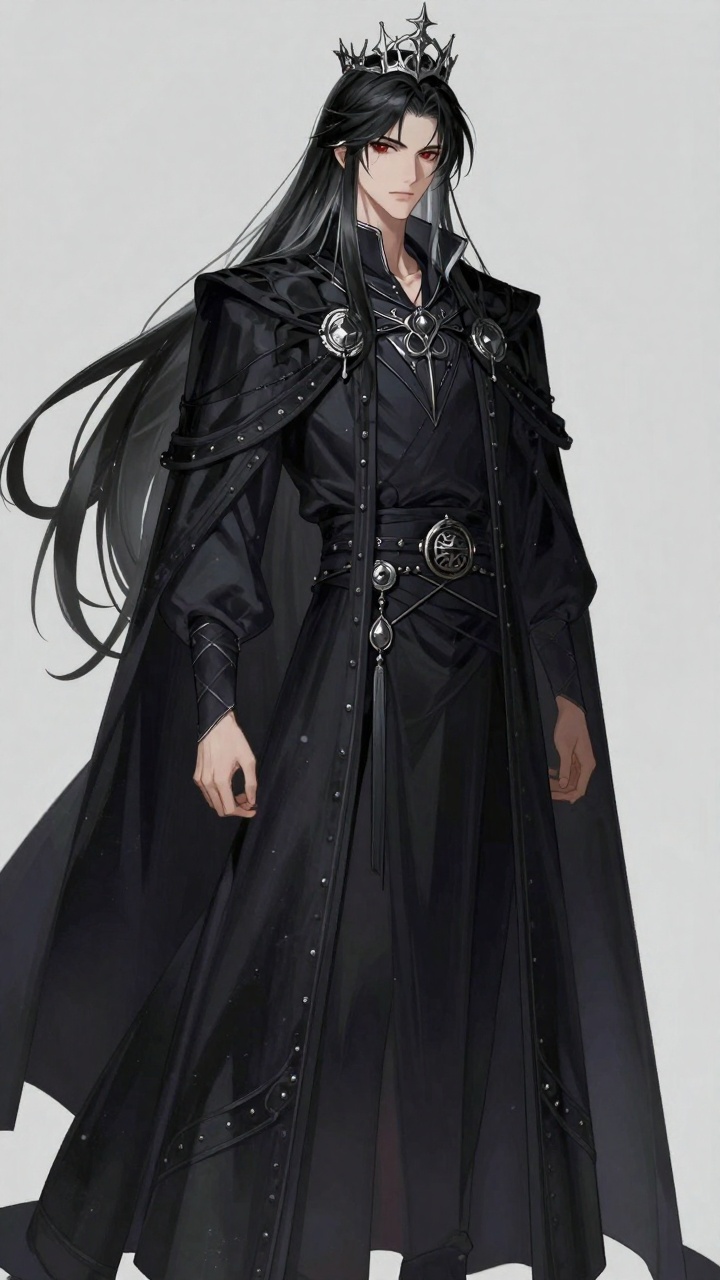
Text-to-Image:
- Name: Raven - Gender: man - Age: (20-25) - Species: Half-demon - Body Type: Tall - Hair: Jet Black with silver streak, Long, flowing past shoulders - Eyes: Deep Crimson - Vibe: Mysterious, elegant, brooding - Accessories: Dark cape, silver crown, ancient ring
Frequently Asked Questions
- What is Z-Image-Turbo?
- Z-Image-Turbo is a 6B-parameter text-to-image model from Tongyi-MAI, engineered for production workloads where latency and throughput matter. It uses only 8 sampling steps to render a full image, achieving sub-second latency on data-center GPUs.
- How fast is Z-Image-Turbo compared to other models?
- Z-Image-Turbo is optimized for speed with just 8 function evaluations per image, delivering extremely low latency. This makes it ideal for interactive products, dashboards, and real-time applications where other models might take several seconds.
- What image quality can I expect?
- Despite its speed, Z-Image-Turbo delivers photorealistic images with reliable on-image text rendering. It's suitable for product photos, hero banners, UI visuals, and commercial applications.
- Does it support Chinese prompts?
- Yes, Z-Image-Turbo understands prompts in both English and Chinese, and can render multilingual text directly in the image. This is helpful for cross-market campaigns, posters, and screenshots.
- What sizes are supported?
- Supports sizes from 256×256 up to 1536×1536 pixels. You can choose square or rectangular images. The default is 1024×1024.
- How does the seed parameter work?
- Set seed to -1 for random results, or use a fixed integer to make outputs reproducible. The same prompt + seed will yield similar images, useful for experimentation and brand consistency.
- What are the system requirements?
- Z-Image-Turbo runs well in 16 GB VRAM environments, making it accessible for local or edge deployments. This reduces hardware costs compared to larger models.
- What are the best use cases for Z-Image-Turbo?
- Perfect for interactive chatbots, design assistants, configuration tools, and any 'click → image' experience. Ideal for e-commerce product photos, social media content, marketing banners, UI mockups, and real-time creative tools where speed matters.
- Can I use it for e-commerce product images?
- Yes, Z-Image-Turbo excels at generating product photos, hero banners, and catalog images. Its fast generation makes it practical for large-scale product catalogs and dynamic product visualization.
- Is it suitable for social media content creation?
- Absolutely! The sub-second latency makes it perfect for generating social media posts, stories, and marketing visuals on-demand. Great for creating consistent brand visuals across campaigns.
- Can I use it for UI/UX design mockups?
- Yes, it's excellent for generating UI visuals, app screenshots, and design mockups. The fast turnaround time allows designers to iterate quickly and explore multiple design concepts.
- How can I use it for marketing campaigns?
- Z-Image-Turbo is ideal for creating marketing banners, posters, and promotional visuals. The bilingual support (English/Chinese) makes it perfect for cross-market campaigns, and the on-image text rendering helps create ready-to-use marketing materials.
- Is it suitable for bulk generation?
- Yes, its efficiency makes large jobs practical—catalogues, continuous feed images, or auto-generated thumbnails. Perfect for generating hundreds or thousands of images without long wait times.
- What makes it different from other text-to-image models?
- Z-Image-Turbo is specifically optimized for speed without sacrificing quality. While many diffusion models need dozens of steps, it achieves photorealistic results in just 8 steps, making it perfect for interactive and real-time use cases.
You Might Also Like
View AllChange Haircut
Quickly change someone's hairstyle and hair color using FLUX Kontext.
Ernie Image Text to Image
Generate high-quality images with Baidu ERNIE Image from multilingual prompts in English, Chinese, and Japanese, with flexible output sizing.
Ernie Image Text to Image Turbo
Generate high-quality images with Baidu ERNIE Image Turbo from multilingual prompts in English, Chinese, and Japanese, with faster response and flexible output sizing.