SkyReels V1 Guide — Free Open-Source AI Video Model
Posted on March 23, 2026 - News
Hey there! Let me tell you about something cool happening in the world of AI videos. It's called SkyReels V1, and it's changing how we create videos using AI.
What Makes SkyReels V1 Special?
I've seen lots of AI video tools, but this one's different. Here's why:
- It's open for everyone to use (unlike some other tools that keep their secrets locked away)
- It's really good at showing faces and emotions - like, really good
- The videos it makes look like they could be from a movie
Let me break that down a bit more.
The Secret Sauce Behind the Scenes
You know how some AI just doesn't get human expressions right? SkyReels fixed that. They trained their AI on millions of clips from movies and TV shows. That's why the videos look so natural.
Here's what makes it work:
- It can spot 33 different facial expressions
- It knows how people should move and stand in a scene
- It can create over 400 different types of movements
- It understands how lighting should look
How Good Is It Really?
I'll be straight with you - it's pretty impressive. When they tested it against other AI video tools, SkyReels V1 came out on top. It scored 82.43 overall, beating other well-known tools like VideoCrafter and CogVideo.
But what does that mean for you? Well, the videos just look better. The people move more naturally, the lighting looks right, and everything feels more... real.
Using SkyReels V1
Want to try it yourself? Here's what you need to know:
What You'll Need
- A decent computer (if you've got an RTX 4090, you're golden)
- Some patience (good videos take time to make)
- Basic knowledge of using command lines
- CUDA version 12.2 (that's what works best)
Getting Started
First, you'll need to get everything set up. Here's how:
- Grab the code:
git clone https://github.com/SkyworkAI/SkyReels-V1
cd skyreelsinfer
- Install what you need:
pip install -r requirements.txt
Running Your First Video
Here's the simplest way to make a video:
python3 video_generate.py \
    --model_id Skywork/SkyReels-V1-Hunyuan-T2V \
    --task_type t2v \
    --guidance_scale 6.0 \
    --height 544 \
    --width 960 \
    --num_frames 97 \
    --prompt "FPS-24, A cat wearing sunglasses and working as a lifeguard at a pool" \
    --embedded_guidance_scale 1.0
Remember to start your prompt with "FPS-24" - it's important!
Making It Work on Regular PCs
Got a RTX 4090? Here's how to make it work without using too much memory:
python3 video_generate.py \
    --model_id Skywork/SkyReels-V1-Hunyuan-T2V \
    --task_type t2v \
    --guidance_scale 6.0 \
    --height 544 \
    --width 960 \
    --num_frames 97 \
    --prompt "FPS-24, A cat wearing sunglasses and working as a lifeguard at a pool" \
    --embedded_guidance_scale 1.0 \
    --quant \
    --offload \
    --high_cpu_memory \
    --parameters_level
Video Sizes That Work Well
Here are some sizes that work great:
- Vertical videos: 544x960 (97 frames)
- Horizontal videos: 960x544 (97 frames)
- Square videos: 720x720 (97 frames)
Using Multiple GPUs
Got more than one GPU? Lucky you! Here's how to use them all:
python3 video_generate.py \
    --model_id Skywork/SkyReels-V1-Hunyuan-T2V \
    --guidance_scale 6.0 \
    --height 544 \
    --width 960 \
    --num_frames 97 \
    --prompt "FPS-24, A cat wearing sunglasses and working as a lifeguard at a pool" \
    --embedded_guidance_scale 1.0 \
    --quant \
    --offload \
    --high_cpu_memory \
    --gpu_num 2  # Change this number based on how many GPUs you have
Speed Comparison
Just so you know what to expect:
- On a single RTX 4090: Takes about 15 minutes
- With 2 GPUs: About 7.5 minutes
- With 4 GPUs: About 5 minutes
- With 8 GPUs: Less than 3 minutes
That's way faster than other tools out there!
FAQ
Q: How long can the videos be? A: With a regular setup, you can make 4-second videos. If you've got more powerful hardware, you can go up to 12 seconds.
Q: Do I need a super powerful computer? A: Not necessarily. It works better with fancy GPUs, but they've made it work on regular computers too.
Q: Is it really free? A: Yep! The whole thing is open source. You can download and use it right now.
Pro Tips
Here's what I've learned:
- Start simple. Try making short videos first
- Give clear, detailed prompts
- Be patient - good videos take time to generate
- Use multiple GPUs if you can - it makes things much faster
What's Next?
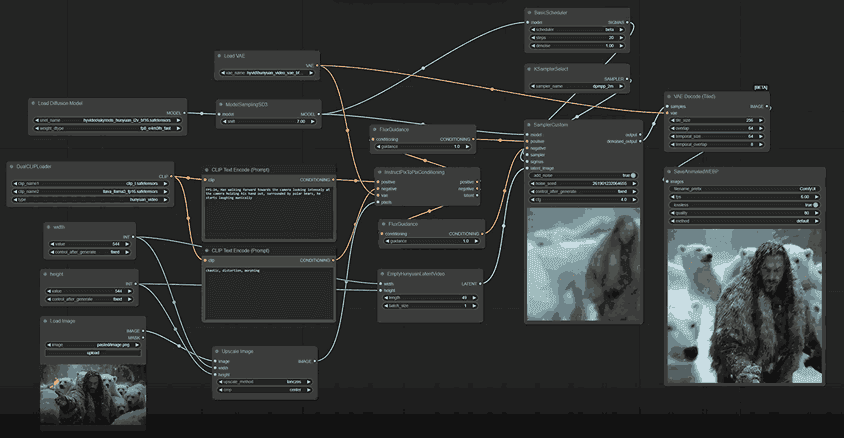
And now comfyui supports loading and using SkyReels-V1-Hunyuan-I2V.
Need more help? Check out their GitHub page or join the community. There's always someone ready to help out!
github: https://github.com/SkyworkAI/SkyReels-V1
model: https://huggingface.co/Skywork/SkyReels-V1-Hunyuan-I2V
comfyui: https://github.com/comfyanonymous/ComfyUI/pull/6862
